Part of the lore of the guild of American medievalists is the famous tale of the coal miner’s cap. By the time it reached me, the story was shorn of the name of the hero and the precise place and time of its (alleged) occurrence, but the truths it contains are timeless and its setting could be in any archive in Europe.
It seems an American medievalist was laboring over documents written in a particularly difficult script, desperately trying to unravel the scrawlings of a dark age scribe in the darkness of the reading room in which he was working. Northern Europe is a land of little sun and nature’s shortfall is seldom made up by artificial lighting during “daylight” hours. Europeans have a long parsimonious tradition of electrical use, and seem quite comfortable reading in near total darkness. In growing frustration and despair, this American decided on a drastic course of action. The next morning he strode proudly into the archive wearing a coal-miner’s helmet and lantern; his mining of the sources of the European Middle Ages would be illuminated by good old Yankee know-how.
The reaction of his European hosts is not recorded, but I suspect he was left in peace, the lights remained off, and this incident was added to the long list of American eccentricities politely tolerated by long-suffering European archivists. I know because I, too, entered European archives this past summer with a sort of miner’s helmet, but this time it was a lap-sized computer.
A lapsized or briefcase computer is the smallest of the race of microcomputers currently sweeping through all aspects of modern life, simultaneously simplifying and complicating as it goes. They symbolize the two laws of computer science: greater computing power in ever smaller enclosures and for steadily less money. For a lapsized to be worthy of the name it must weigh no more than ten pounds, be no larger than an attache case, and come complete with keyboard, internal power supply, and liquid crystal display. This is about as far as generalizations can go, for lapsized computers can have built-in disk drives, modems, larger screens, more internal memory (RAM) and myriad other features. They can also range in price from $300 to $3000.
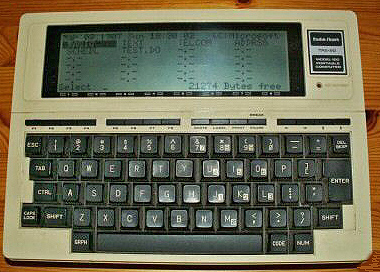
Radio Shack TRS-80 Model 100
The grandfather and Urtype of this generation of computers was the Radio Shack 100, introduced in 1983. Its introduction caused a sensation in computer circles and it quickly became popular particularly among journalists who valued its easy portability, good word processing capability, and built-in modem for transmitting finished stories back to their papers over telephone lines. A simple machine, it weighs less than five pounds and has the dimensions of a very thick legal pad. It has a typewriter-type keyboard, which I prefer to that of my IBM PC, and in addition to a modem it offers an RS 232 port through which information can be transmitted via cable to another computer. There is also a jack through which information can be stored on a cassette recorder when the limited internal memory (24 KB or about twelve double-spaced pages) is full. The 100 has its drawbacks: the liquid crystal display, while quite readable, only displays eight forty character lines at a time; cassettes are unwieldly and slow compared to floppy disks and snail-like compared to hard disks. While these shortcomings disqualify the 100 as one’s only computer, its great portability makes it perfect as a second computer whose data can be transferred (or downloaded in computer jargon) to a larger computer. This eliminates the need to take notes by hand only later to type them into the computer. The price is also another strong point for historians, for a complete system of this type (either the 100 or NEC 8201) presently costs less than $400 and will probably decrease.
But how does the lapsized perform in the field? Is it quiet enough to be used in archives and libraries without drawing irate stares and invitations to leave? Is it possible to download large amounts of data into a larger micro, in my case an IBM personal computer? Is it finally such an improvement over taking notes by hand? These were the questions I set out to answer on this past summer’s research trip to Europe.
My trip began with a brief visit to the Library of Congress where my computer did not draw so much as a second look. But this changed dramatically upon my arrival in Bruges, Belgium. Bruges is an open air museum of a city, where the spirit of the Middle Ages survives amid twentieth-century traffic. Its archives are true to this spirit of gentle antiquity and medieval chaos, for the sources of medieval history are divided among at least five separate archives, which occupy buildings ranging from the seventeenth-century bishop’s palace to a sixteenth-century former nunnery. The archivists are similarly diverse, from the aristocratic septuagenarian of the episcopal archive to the enthusiastic thirty-year-old caretaker of the archive of the Seminar of Bruges. I expected a wide variety of reactions to a computer-packing American.
The Model 100 keyboard is fortunately very quiet, and without the hum and whir of disk drives, there was little danger of excessive noise. In fact, the greatest challenge in obtaining permission to use the computer in the archives was explaining how it worked in understandable Dutch. Computerese has not made its way into English-Dutch dictionaries, so it required a week or so of reading IBM advertisements in local papers to learn that teksiverwerking was wordprocessing, and electronisch geheugen meant electronic memory. But there was not a hint of opposition on the part of the archivists, although none of them had any experience using computers and only the younger archivists expressed determination to acquire a computer of their own. Some of the younger scholars I encountered attributed this lack of computers to Belgian backwardness. So, unlike my American forebear, my coal miner’s cap of the eighties was not only humored as an acceptable eccentricity, but envied as a means to simplify work.
The weeks passed as I worked through the archives of Bruges with an occasional trip to the General Archives in Brussels. The differences of using a computer to take notes became apparent, particularly since freedom from the fatigue of holding a pen hour after hour made my time more productive. I also discovered that wordprocessing is not yet subtle enough to capture all the nuances of medieval script, so I was forced to keep a parallel notebook where I recorded the few things my computer could not. My notes were stored on high-quality cassettes at the end of every work session and I was careful to make two copies on separate cassettes. I exhausted and replaced many of the AA batteries that feed the computer for about twenty hours at a time, but these were easily purchased in Belgium. As my departure date neared, I packed up fourteen ninety-minute cassettes, seven in carry-on luggage and seven to be checked, as the harvest of my archival work.
The crucial test of this experiment was transferring the files I had created on the Model 100. It is always well to remember one truth about computers: each computer is a microcosm unto it self and communicates with difficulty, if at all, with another member of its race. Most lapsized computers, however, derive their value from the ability to communicate and trade information with other computers. The 100 has two built in communication channels. The first is a modem that allows files to be sent over telephone lines by means of the communications software resident in the 100’s memory. This opens up the possibility to historians of swapping information with a larger home computer or the university mainframe anywhere a telephone reaches. The drawback is the 300 baud transmission rate is slow and the cost would soon be prohibitive if the distance from the home base was too great or if done from a hotel with a 400 percent surcharge.
The second possibility for transferring files is, to me, the most valuable. At the 100’s back is a RS 232 port, an imposing name for a rather simple concept. This port allows connection, via a cable, to an IBM personal computer. It also allows data transmission at much faster rates than possible over telephone lines, as much as thirty times faster (9600 rather than 300 baud). The connection is not quite as easy as hooking up a simple cable, for a null modem and adapter were also necessary. A null modem is actually a device that “fools” the computer into thinking it is sending information over a telephone line. Once the connection between the computers is established and both the 100 and IBM are running a communications program (I prefer the “freeware” product PC Talk for the IBM), file transmission can begin.
Transmission of text files between computers is only possible because of one important piece of standardization in the largely unstandardized world of computers. ASCII (American Standard Code for Information Interchange) as signs a number between 1 and 127 to all the letters of the Roman alphabet, both upper and lower case, and to a set of other symbols as well. Most all computers use ASCII code to represent textual information. Thus, the notes I typed into the 100 and stored on cassette tapes thousands of miles away are reloaded into memory sent across (ported over in computer jargon) and stored on the IBM’s hard disk. But there is one additional difficulty that may have to be overcome before these new text files can be manipulated with a wordprocessing program.
This problem is a good example of how standardization in theory is not standardization in practice. Both the 100 and the IBM use ASCII codes but they do not use them in quite the same way. The 100 creates a file structure using a simple line feed to indicate end of line. The IBM file structure uses both a line feed and a carriage return, so text transferred from the 100 will all appear in one line because no line feeds are present. There are two ways around the problem. The first is to allow your wordprocessing program to rearrange the text, putting in the paragraph breaks yourself. The second and more elegant solution is to use a simple BASIC program to add a line feed to the text file. One version of this program appears in Martin D. Seyer’s book The IBM PC/XT: Making the Right Connections, p. 152.
My conclusions about the value of lapsized computers after my summer mining expeditions are largely positive. Nowhere did I meet the slightest resistance to the use of my computer, and more importantly, my time in the archives was more productive as a result. Avoiding the strain of copying notes out in longhand also spared me illegible notes in the long run and gave me more productive hours in the archives. But the true benefit of computerized notes only became apparent on my return home. The results of my work are now stored on my personal computer, able to be instantly recalled, copied, or rearranged at my whim. The drawbacks I discovered were mainly with the technology. An eight-line screen is minimally acceptable at best, and the awkwardness of cassette storage was sometimes a problem when I wanted a particular bit of information. But these shortcomings have already been solved by recent generations of lapsized portables; we just have to wait until their prices shrink to match a professor’s purse. There may come a day in the near future when the computer will replace the legal pad and note card as the historian’s front-line research tools. Now if they only developed a model complete with flood light.
James M. Murray is in the department of history at the University of Cincinnati, Ohio.